Set defaults for new galleries
Gallery defaults decide how every new gallery starts: its layout, what clients can do, branding and features. You set them once instead of changing the same settings in every gallery. Changes to defaults don't touch galleries you've already created.
Open the defaults
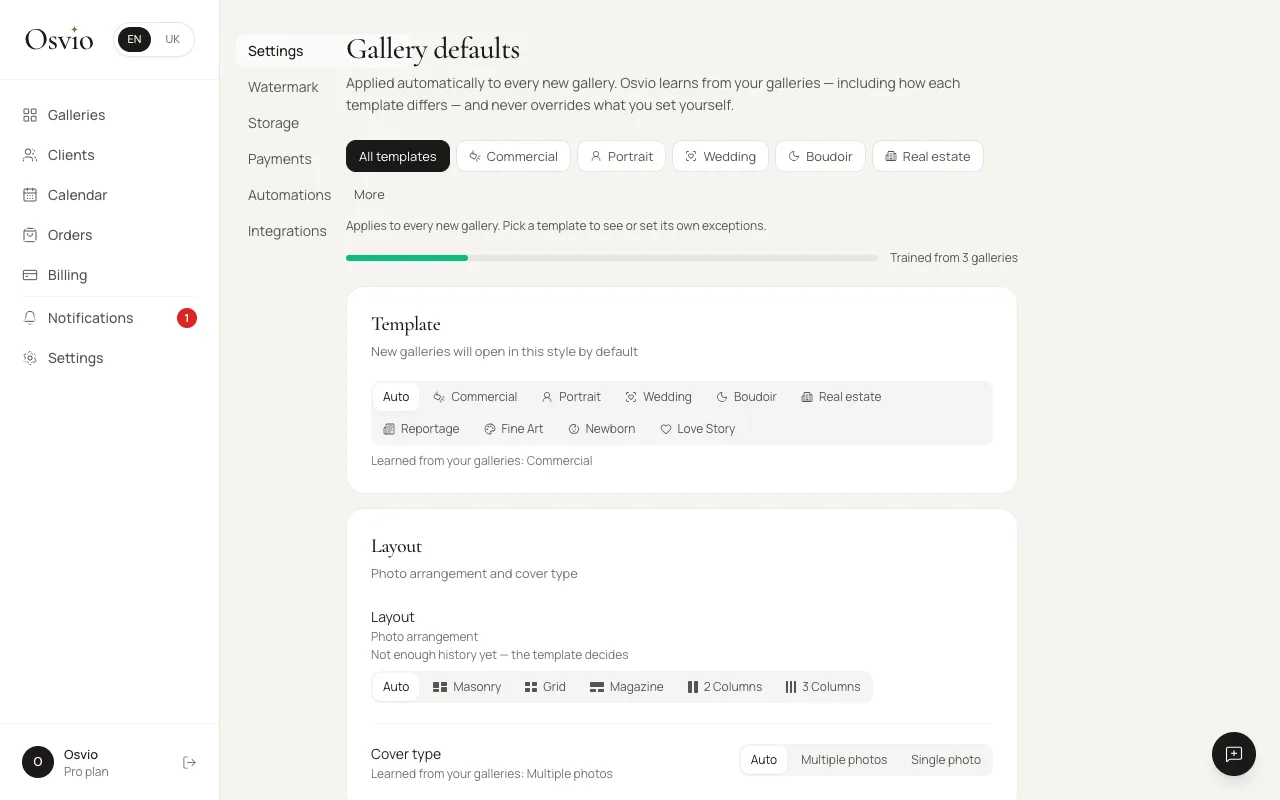
Open Settings. The first tab, Settings, is titled Gallery defaults. It reads: "Applied automatically to every new gallery. Osvio learns from your galleries — including how each template differs — and never overrides what you set yourself."
Choose a scope
At the top, pick All templates to set defaults for every new gallery, or pick one template to set exceptions for just that template. For a single template, Auto falls back to your defaults for all templates.
Set the values
Each setting is Auto, On or Off (or a value, such as a limit):
- Auto lets Osvio decide. It shows what it has learned from your galleries, for example "Learned from your galleries: On", or says there isn't enough history yet.
- On and Off are your choice. A value you set yourself is never changed by learning.
A bar under the scope buttons says how much Osvio has learned, for example "Trained from 3 galleries".
The settings are grouped in sections:
- Template: the style new galleries open in. Auto lets Osvio choose from what you create.
- Layout: the photo arrangement and the cover type.
- Access & Interaction: Allow comments, Allow likes, Allow downloads and Watermark on download.
- Branding: Show logo and Hide Osvio copyright.
- Features and AI: AI scene tags, Face filters, Extra products and Expiry banner.
Other defaults include the likes limit, sharing, screenshot protection, asking clients for their name, and the Gallery expiry period.
Select Save to keep your changes. Reset to automatic learning hands your settings back to Osvio's learning.
What defaults can't override
- Settings your plan doesn't include are switched off when a gallery is created. For example, Watermark on download needs the Basic plan, and Face filters, Extra products and Hide Osvio copyright need Standard. Custom expiry is covered in Set when a gallery expires.
- Some templates always set certain values (the page tells you: "Always set by the template"). For example, screenshot protection is always on and asking clients for their name is always off for Love Story and Boudoir.
- A learned Face filters value of On still asks for consent the first time you upload photos.